Almost nobody chooses a backup type on purpose. You choose one the day a plugin update breaks checkout, or the day your host’s storage bill jumps, or the day a “quick backup” pins your server for twenty minutes. “Incremental” is the word every backup tool reaches for in those moments – it sounds fast and cheap, so everyone claims it. This guide explains what an incremental backup actually is, how it differs from full and differential backups, the trade-offs that matter, and how Backvera does incremental for WordPress without the usual catches.
TL;DR. A full backup copies your entire site every time – simple to restore, but slow and storage-hungry. An incremental backup captures a full baseline once, then stores only what changed after that, so day-to-day backups are small and fast. The classic downside of incrementals – fiddly, chain-dependent restores – is a tooling problem, not a law of physics: Backvera keeps the chain for you and presents every snapshot as a complete point in time you can restore in one step.
What is an incremental backup?
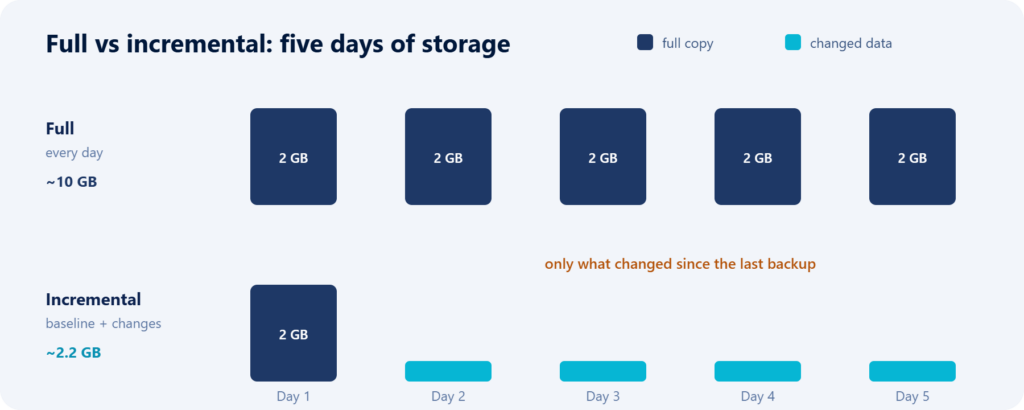
An incremental backup stores only the data that has changed since the previous backup. The very first run is a full backup – a complete copy of your site, usually called the baseline. Every run after that looks at what is different and saves just that difference: the new order, the edited page, the uploaded image. Anything already stored safely is not copied again.
The payoff is easy to picture. If your 2 GB site gains 30 MB of changes on a given day, that day’s incremental backup is roughly 30 MB – not another 2 GB. Multiply that across daily (or hourly) backups and the savings in time, storage, and server load are enormous.
How incremental backups work
Two things have to happen for an incremental backup to be trustworthy: the tool must correctly detect what changed, and it must be able to reassemble a complete site from the baseline plus the changes when you restore.
Detecting change is the interesting part, because a WordPress site is really two systems bolted together:
- The filesystem – WordPress core, plugins, themes, and your uploads and media library. Files are easy to compare: a file is new, changed, or identical to the copy already stored.
- The database – posts, pages, products, orders, settings, and users. This is where many tools get lazy and re-export the whole database on every run, then call the backup “incremental” because the files were incremental.
A real incremental backup has to handle both layers. If the database half is a full dump every time, then on a busy store – where the database is the part that actually changes – you are barely saving anything.
Full vs incremental vs differential vs synthetic full
“Incremental” only makes sense next to the alternatives. Here is how the common backup types compare.
| Type | What it saves | Needs a baseline? | Backup speed | Storage use | Restore | Best for |
|---|---|---|---|---|---|---|
| Full | Your entire site, every time | No | Slowest | Highest | One step | Clean rollback points; small, rarely changing sites |
| Incremental | Only what changed since the last backup | Yes | Fastest | Lowest | Baseline plus the changes | Active sites backed up often |
| Differential | Everything changed since the last full | Yes | Medium, grows until the next full | Medium | Baseline plus one differential | A middle ground between full and incremental |
| Synthetic full | Nothing new – a full is assembled from the baseline plus increments on the server | Yes | Fast, built off your site | Like a full | One step | Full-style restore points without re-scanning your site |
Backvera uses an incremental model under the hood – a full baseline, then only changes – but it borrows the best property of a synthetic full: every snapshot behaves like a complete restore point. You choose a date and time, not a stack of increments to replay by hand.
How Backvera does incremental
Files: only what changed
Your first Backvera backup is a full baseline. After that, Backvera uploads only the files that are new or modified. An unchanged image is never uploaded twice, however many backups you run. That is what keeps everyday backups small and quick.
The database, done properly
Instead of re-exporting the whole database each run, Backvera captures it table by table and recognises when a table has not changed, reusing the copy it already holds. On a typical store, the vast majority of tables are identical from one backup to the next, so they cost you nothing on the next run – while the tables that did change (orders, sessions, logs) are captured fresh.
Every snapshot is a complete site
This is the part that removes the classic incremental headache. With naive incremental tools, restoring means locating the baseline and replaying every increment in order – and if one link in that chain is missing or corrupt, the restore is in trouble. Backvera manages the chain for you: each snapshot within your retention window is presented as a full, restorable point in time. You never stitch increments together yourself.
Realtime: incremental, continuously
Realtime is incremental taken to its limit. On the Scale plan, Backvera captures changes as they happen – a periodic baseline plus a steady stream of small deltas – so a new order or a published post is protected within minutes rather than at the next nightly run.
The storage and speed math
Numbers make the difference concrete. Imagine a 2 GB WordPress site that changes by about 50 MB a day.
- Daily full backups: roughly 2 GB every day – about 60 GB a month before compression, plus the time and server load of reading your entire site each night.
- Daily incremental backups: a one-time 2 GB baseline, then about 50 MB a day – on the order of 3-4 GB across a month. Same protection, a fraction of the storage.
The speed story mirrors the storage one. Reading and sending 50 MB is quick and light; reading and sending 2 GB every night is neither. That is why incremental backups can run hourly – or continuously – without dragging on your site, while full-only backups tend to be relegated to once a night. (These figures are illustrative; your real numbers depend on how much your site actually changes, but the shape is always the same: incremental cost tracks your changes, not your total size.)
How often should you back up?
Two questions decide your ideal cadence, borrowed from the disaster-recovery world:
- RPO (recovery point objective): how much work can you afford to lose? If the answer is “an hour of orders,” a nightly backup is not enough – you need hourly or realtime. RPO is really a question about backup frequency.
- RTO (recovery time objective): how quickly do you need to be back online? This is about how fast and how simple your restore is.
Because incremental backups are cheap to run, they let you shrink your RPO dramatically – from “once a day” to “every hour” or “as it happens” – without a storage or performance penalty. A sensible rule of thumb:
- Low-change sites (brochure sites, slow blogs): daily is usually plenty.
- Active sites (busy blogs, membership, agency-managed): hourly or 6-hourly.
- Stores and transactional sites (WooCommerce, Easy Digital Downloads, bookings): realtime, so an order is never more than minutes from being protected.
The one real catch with incremental backups
Every honest guide has to mention the downside: because increments depend on the baseline before them, a naive incremental system is only as good as the integrity of that chain. Lose or corrupt an increment and later restore points can be compromised. That is the reason some people still trust plain full backups more.
The fix is not to abandon incremental – it is to use a tool that treats the chain as its own responsibility. Backvera does that in a few ways: it keeps the whole chain intact for the life of your retention window, and it lets you preview a restore with a dry run and keep a safety backup before you commit. You get incremental economics with full-backup peace of mind.
A backup strategy that actually works
The label on your backup matters far less than the habits around it. A strategy that holds up:
- Start with a full baseline, then run frequent increments. This is the default with Backvera – you do not have to choose.
- Match frequency to your RPO. Daily for quiet sites, hourly for active ones, realtime for stores.
- Keep backups off-site. A backup that lives on the same server it is meant to protect disappears with that server. Backvera stores every snapshot in Backvera Cloud, independent of your web host.
- Set retention deliberately. Enough history to recover from a problem you notice late, without hoarding forever.
- Test your restores. An untested backup is a hope, not a plan. Restore to a staging site now and then to prove it works before you need it.
Frequently asked questions
Do incremental backups need a full backup?
Yes. The first backup is always a full baseline; every backup after that stores only what changed since the last one.
Do I have to keep every increment to restore?
With Backvera, no – you do not manage the chain by hand. Each snapshot within your retention window is restorable as a complete point in time; Backvera assembles the baseline and the relevant changes for you.
Which restores faster, full or incremental?
With Backvera the restore experience is the same either way: you pick a moment in time and it is put back as a complete site. Restore time depends on how big your site is, not on how many increments were taken.
What is the difference between incremental and differential?
An incremental backup saves what changed since the last backup of any kind. A differential saves everything changed since the last full backup, so differentials keep growing until the next full is taken.
Are incremental backups safe?
They are, provided the tool protects the chain. Backvera keeps the full chain for your retention window, flags any snapshot that could not capture everything as a warning, and lets you dry-run and take a safety backup before restoring.
Do incremental backups save storage?
Yes, substantially. Only changed files and changed database tables are stored; unchanged data is not copied again on each run.
Will backups slow down my site?
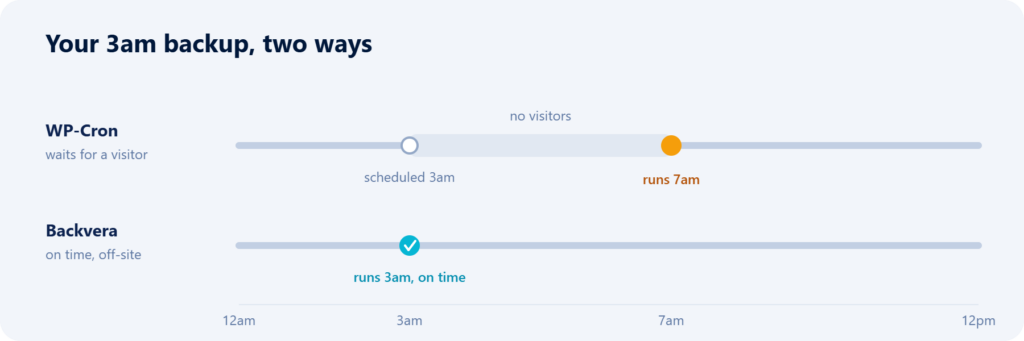
No. Backvera runs backups on its own servers rather than in WP-Cron, and only reads and sends what changed – so even hourly or realtime backups stay light on your host.
Should a WordPress site use full or incremental?
Both – and you get both automatically: a full baseline for a clean starting point, then frequent increments so you always have a recent restore point. Stores should add realtime.
The bottom line
“Incremental” is not a marketing sticker – it is a genuinely better way to protect a site that changes, because the cost of each backup tracks your changes instead of your total size. The historical downside, awkward restores, is a solved problem when the tool owns the chain and hands you complete restore points. That is exactly the model Backvera is built on: a full baseline, only-what-changed after that, realtime when you need it, and every snapshot restorable in one step.
See how Backvera backups work, choose a cadence in your backup schedule, and when the moment comes, restore your site in a few clicks.