The audit log is a running record of every change made in your workspace, plus sign-in events for your members. It is the place to go for accountability, security review, and answering “who changed what, and when”.
Open Audit log from the Workspace section of the sidebar. Workspace Owners and Admins can view it.
What each entry shows
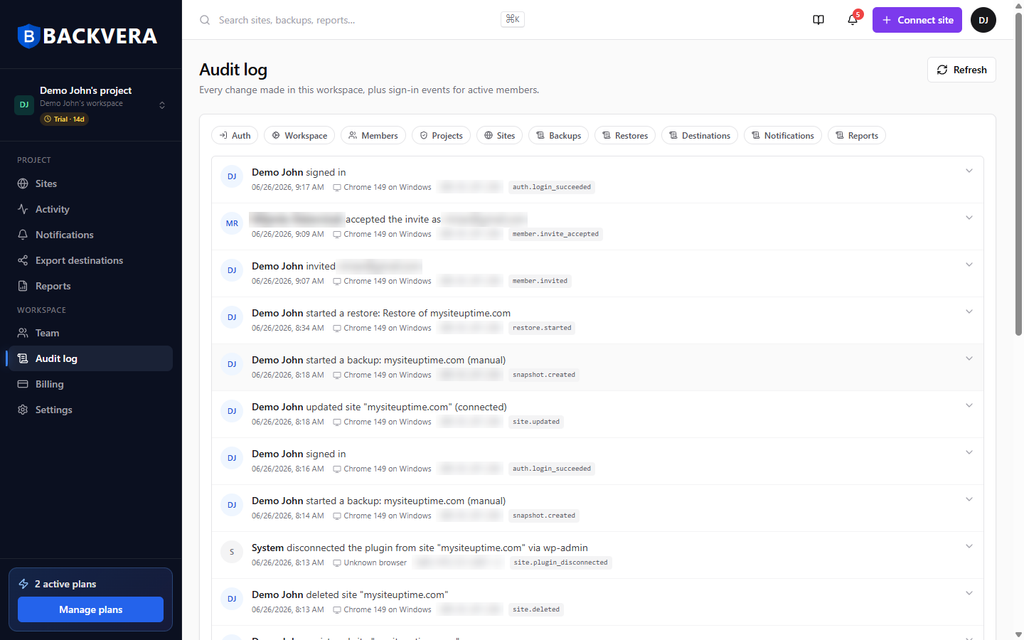
Every entry records who did what, when, and from where:
- Who – the person who performed the action (with their avatar and name), or System for automated actions.
- What – a plain-English description plus an event code, such as
snapshot.created,restore.started,site.updated,member.invited, orauth.login_succeeded. - When – the date and time.
- Where – the browser and operating system, and the IP address the action came from.
Expand any entry to see its full details, including the raw metadata captured for that event.
Filter the log
Use the filter chips at the top to focus on one category: Auth, Workspace, Members, Projects, Sites, Backups, Restores, Destinations, Notifications, or Reports. Click Refresh to pull in the latest events.
Examples of what gets logged
- Sign-ins and security events.
- Member invites, acceptances, role changes, and removals.
- Site connects, setting changes, and deletions.
- Backups and restores you start.
- Changes to export destinations, notifications, and reports.
- Plan and billing changes.
Automated, system-driven events are attributed to System – for example, when Backvera detects that a site’s plugin was disconnected.
How long it is kept, and exporting it
Audit entries are kept for the life of your workspace – they are not deleted on a schedule, so older history stays available for review. There is no separate audit-log file export, but the entries you can see are included when you export your account data.
Still need help? Email our team at [email protected].