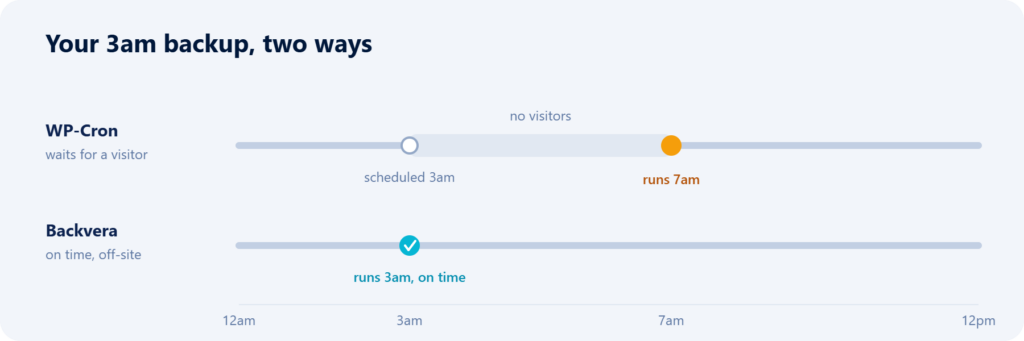
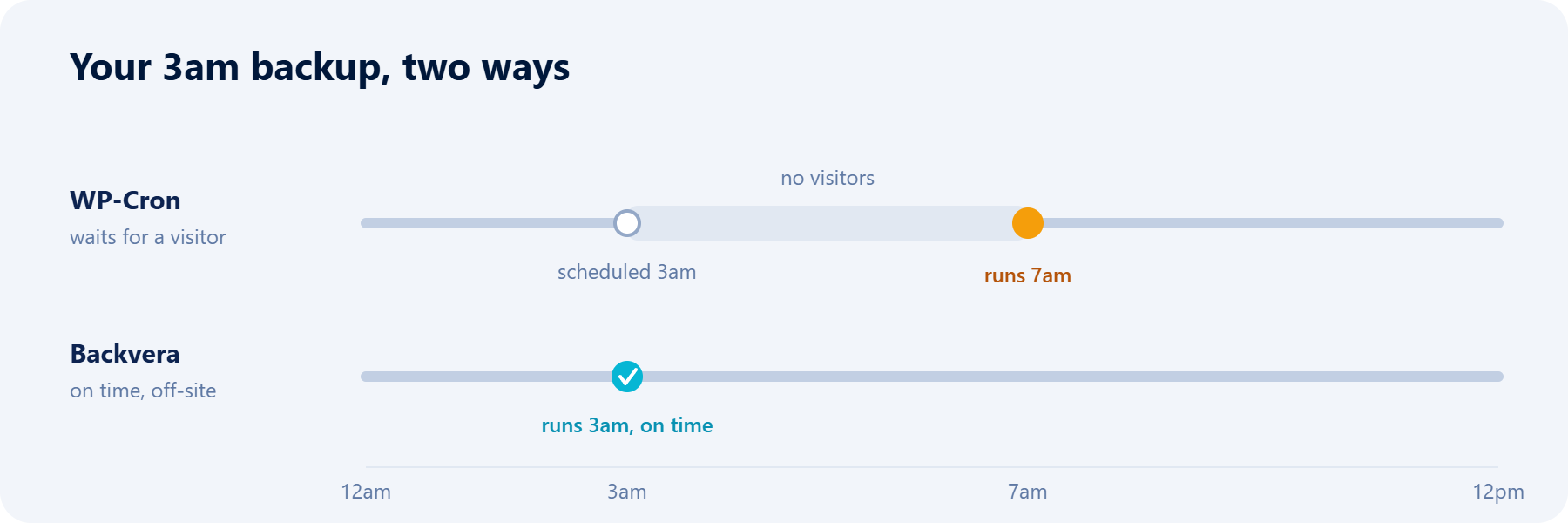
Somewhere in your WordPress install, a scheduler is quietly deciding when your backups run. If that scheduler is WP-Cron, your “nightly 3am backup” may actually be running at 7am – or noon, or not at all. WP-Cron is a clever convenience for light housekeeping, but it is the wrong tool for something as important as backups. Here is why, and what to use instead.
TL;DR. WP-Cron is not a real scheduler – it only runs when someone visits your site, it runs inside a normal page request (so it competes with your visitors), and it has no memory of a missed run. That is fine for sending an email. It is a poor foundation for backups. Backvera schedules on its own servers, reaches your site at the right time whether or not anyone is visiting, retries if the site is briefly unreachable, and can capture changes in realtime.
What WP-Cron actually is
Despite the name, WP-Cron is not the system cron your server runs. It is a pseudo-cron built into WordPress. On most sites, every time a page loads, WordPress checks whether any scheduled tasks are due and, if so, fires them in a background request to wp-cron.php. Scheduled posts, plugin cleanups, update checks, and email digests all ride on this mechanism.
The design is deliberate: WordPress needs no server configuration to run scheduled tasks. For the jobs it was meant for, that trade-off is perfectly reasonable. Backups are not one of those jobs.
Problem 1: it only runs when someone visits
This is the big one. WP-Cron fires on page loads, so if nobody is on your site, nothing runs. On a high-traffic site you barely notice. On a quiet site it is a real gap: if the last visitor leaves at 11pm and the next arrives at 7am, your 3am job waits until 7am. The one night something went wrong and you wanted a clean 3am restore point, you have a 7am one instead – taken after the damage.
It is worse for low-traffic and internal sites, where hours can pass with no visitors at all. A schedule that depends on traffic is not a schedule; it is a suggestion.
Problem 2: it competes with your visitors
Because WP-Cron runs inside a page request, whoever triggers a heavy job effectively pays for it. A backup is about the heaviest thing a WordPress site can do – reading files, exporting database tables, compressing data. Run that through WP-Cron and one unlucky visitor gets a slow page while the job churns, or the request hits your host’s timeout and the backup dies half-finished.
Problem 3: it forgets
System cron will run a missed job the next chance it gets, and can be told to retry. WP-Cron has no such memory. A run that did not happen simply did not happen; a run that failed halfway leaves nothing but a broken attempt. For a backup, “we just did not take one that day” is exactly the failure you cannot afford.
“But I set up a real cron to hit wp-cron.php”
Good instinct – pointing a real server cron at wp-cron.php (and setting DISABLE_WP_CRON) fixes the visitor problem: the job now fires on a fixed schedule regardless of traffic. But it does not fix the rest. The backup still runs on your server, competing with your live site for CPU and memory, still bound by your PHP time and memory limits, and still with nobody outside the box checking whether it actually succeeded. You have improved the trigger, not the engine.
How Backvera schedules instead
Backvera does not lean on WP-Cron at all. The schedule lives on Backvera’s own servers. At the appointed time, Backvera reaches your site, runs the backup, and watches it through to completion – no visitor required, and the heavy lifting happens off your host rather than inside a page request.
Three things follow from that:
- It runs on time, every time. 3am means 3am, whether or not anyone is browsing.
- It retries. If your site is briefly unreachable at the scheduled moment, Backvera does not shrug and skip the day – it retries with a sensible backoff.
- It survives long jobs. When a big site would blow past a single PHP request’s time limit, Backvera continues the backup across several passes instead of dying at the timeout. A large media library becomes a matter of patience, not a failure.
WP-Cron vs server cron vs Backvera
| WP-Cron | Server cron to wp-cron.php | Backvera | |
|---|---|---|---|
| Runs without visitors | No | Yes | Yes |
| Runs off your server | No | No | Yes |
| Competes with your visitors | Yes | Yes | No |
| Survives PHP timeouts on big jobs | No | No | Yes, continues across passes |
| Retries a failed or missed run | No | No | Yes |
| Watches the job to completion | No | No | Yes |
| Can capture changes in realtime | No | No | Yes, on Scale |
How often should backups run?
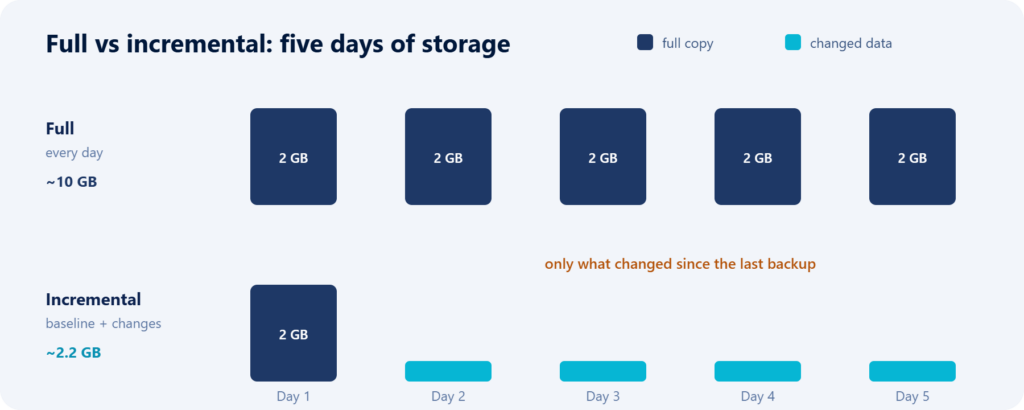
Once the scheduler is reliable, you can use frequency as a tool. Match it to how much work you can afford to lose: daily for a site that rarely changes, hourly or 6-hourly for an active one, and realtime for a store where every order matters. Because Backvera backups are incremental and run off your host, turning up the frequency does not punish your site. See setting your backup schedule.
Frequently asked questions
Why did my backup not run at its scheduled time?
If your backups depend on WP-Cron, the most common cause is simply that no one visited the site around that time, so the scheduler never fired. A server-side scheduler like Backvera does not have this problem.
Does disabling WP-Cron break my site?
No. Disabling WP-Cron only stops WordPress from checking for scheduled tasks on page loads. As long as something else runs those tasks (a real server cron, or a service that does the work off-site), your scheduled posts and cleanups keep working.
Should I use a real cron job for backups?
A real cron is better than WP-Cron for firing on time, but the backup still runs on your own server, under your PHP limits, with no external oversight. An off-site backup service removes those constraints entirely.
Do Backvera backups use WP-Cron?
No. Backvera schedules on its own infrastructure and reaches your site to run each backup, so backups do not depend on your site’s traffic or on WP-Cron.
What happens if my site is down at backup time?
Backvera retries with a backoff rather than skipping the run, so a short outage or restart does not cost you that backup.
Will scheduled backups slow my site down?
No. The work happens off your host and only changed data is read and sent, so even frequent backups stay light on your server.
The bottom line
WP-Cron is a fine way to send an email when someone happens to visit. It is a poor way to guarantee a backup at 3am on a site nobody is visiting at 3am. Backups deserve a scheduler that runs on time, off your server, with retries and oversight – and, when you need it, one that can keep up in realtime. Set a cadence you can trust in your backup schedule, and if a site ever shows as overdue, learn what its status means.