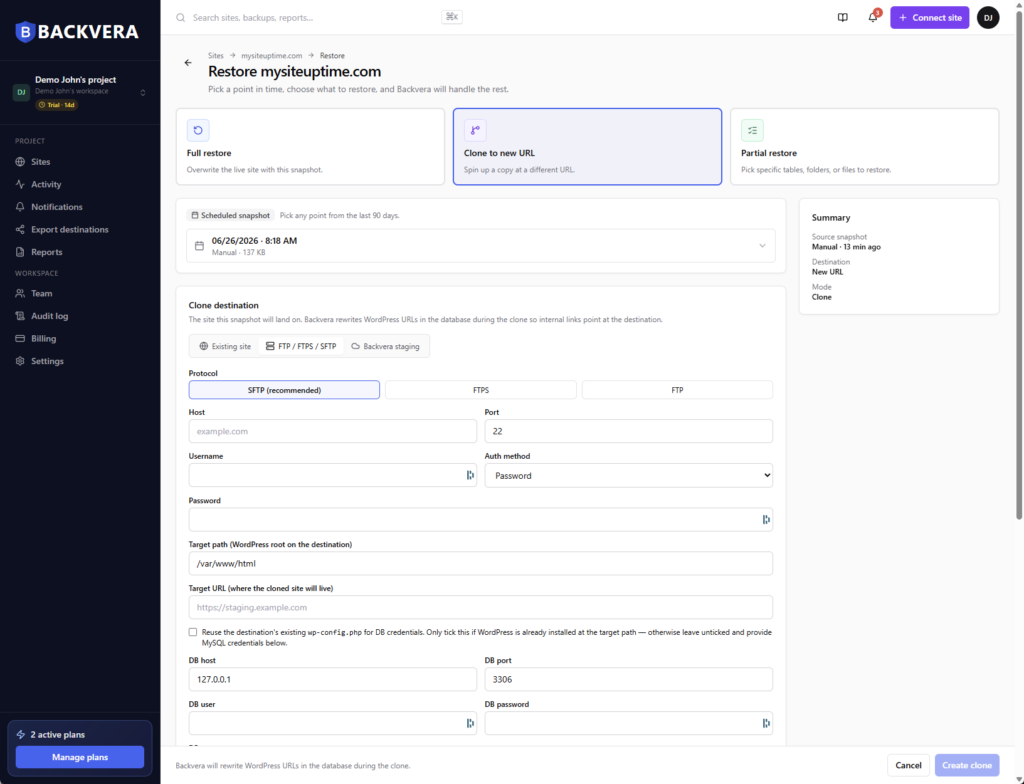
1. Start a restore
From the site you are moving away from. Every snapshot is a candidate.
Clone a snapshot to another site you have registered, or straight to an SFTP or FTP target. Backvera rewrites internal URLs so links, settings and references point at the destination.
Files move easily enough. What breaks is a database still pointing at the old address, and finding out only once the domain already moved.
From the site you are moving away from. Every snapshot is a candidate.
Then pick the destination: a registered site, an SFTP or FTP target, or a staging environment.
Clone into a stage first if you would rather look before the domain moves.
Switch once you have seen it working — not before.
Business is $36 a year per site and Scale is $60. Both also add external destinations, so you can keep a copy on storage you control. Every paid plan starts with a 14-day free trial and no card.
Start your 14-day trialNo. Backvera rewrites internal URLs so links, settings and references point at the destination rather than the original site.
Three places: an existing site registered in Backvera, a new SFTP or FTP target you give credentials for, or a Backvera managed staging environment.
Yes. Clone into a staging environment on the destination and look at the result first.
Download a backup as a ZIP at any time and take it wherever you like.
Yes. Snapshots live off-site rather than on either host, so your history comes with you.
Business is $36 a year per site and includes cloning. Try it free for 14 days, no card required.
Clone the snapshot, check it, then switch. 14 days free, no card required.
Start your 14-day trialWordPress is a trademark of the WordPress Foundation. Backvera is an independent product and is not affiliated with, endorsed by, or sponsored by the WordPress Foundation.